I like border crossings by land. The way a country changes into another, gradually, is enticing. This time, I had one more chance for a Balkan to Schengen area border crossing after 2 years, once more in the summer. This time crossing from Timisoara, Romania to Szeged, Hungary. Since we bought the bus tickets on-board (Flixbus), it was more expensive than buying online. It costs 129 Lei per person, each way. Online, it was 15.90 euro (73 Lei). Unfortunately, the online payment system was failing for both cards and paypal (an obvious temporary issue with their system). This is almost the double. Szeged is a beautiful city. So it was worth the visit.
Make sure you have the passport and visa to the destination country before you board the bus. You need a visa to return to the country of origin, if you plan to return to the country (same as if you would use a flight). If you do not have the valid identity document (usually passport, and it is the safest option) or visa, you need to return to the country of origin. Since the borders are in a weird remote locations, it will be tough for you to return. You may either need to hichhike into vehicles or walk a long distance to find the nearest town. I do not want to try this. Be well prepared, specially if you are coming from a third country that requires you a visa for both the countries that are you traveling between.
Given below is a detailed transcript of what is executed in the above screencast on checking out, building, running, and developing Bindaas with Git, Maven, and IntelliJ IDEA.
Skip the step 1 below and go directly to step 2 if you do not have access to the source code of Bindaas. If you have access to the source code of Bindaas, follow step 1, followed by step 2.
Step 1: Building Emory Bindaas
Alternatively, you may choose to build Bindaas from source. I would recommend using the maven-restructure branch (or maven-restructure-dev branch, if you would like to be in the bleeding edge, though most branches are periodically synced) for that, as it consists of fixes and enhancements to Maven integration. Hence this branch enables easy integration with multiple IDEs such as IntelliJ IDEA, Eclipse, and all the Java IDEs that have Maven integration, where currently master branch supports only Eclipse IDE.
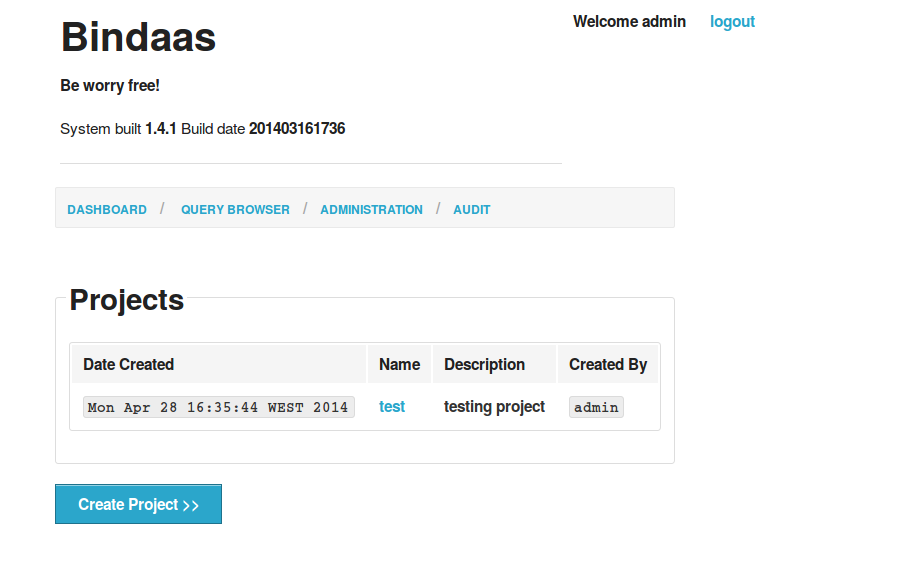
Create Project in Bindaas
Bindaas has been tested with Oracle Java 1.8.x.
Clone the source code.
$ git clone git@github.com:sharmalab/bindaas.git
$ cd bindaas
$ git checkout dev
$ mvn clean install
$ cd dist
Step 2: Running Emory Bindaas
Change to the bin directory of Bindaas distribution (either that is downloaded as binary, or that is built from the source following step 1),
$ cd bin
You may run Bindaas using one of the 3 options below: Option 1
$ ./startup.sh
This starts Bindaas using nohup. Logs could be found at log/bindaas.log. You may stop the program later by running the shutdown.sh script.
Option 2
If you rather like to have the logs in the foreground in the terminal itself, instead of using the start up script, you may run the java command directly.
$ java -Dpid=BINDAAS_INSTANCE -Xmx1024m -jar org.eclipse.osgi_3.8.2.v20130124-134944.jar Option 3
Alternatively, start with -console flag to have OSGi console:
$ java -Dpid=BINDAAS_INSTANCE -Xmx1024m -jar org.eclipse.osgi_3.8.2.v20130124-134944.jar -console
Now you have started Bindaas using one of the above 3 options, you may connect to the dashboard at http://localhost:8080/dashboard/ using the user name and password, "admin", "password".
Make sure to have the trailing "/" at the end of URL as shown above.
Once you have created a project using the "Create Project" command, you may define the data providers for the project at http://localhost:8080/dashboard/workspace/{project_name}
You may choose a database such as a mysql or Mongodb databases, or use an HTTP provider.
Once the data provider is defined, queries could be created from the respective listing page of the data provider,
Created queries could be viewed from http://localhost:8080/dashboard/{project_name}/{data_provider_name}/query/{query_name}
"Try Me" option could be used to view the outputs of the query.
This is a very simple post on starting to use Bindaas. You may read further on creating a new data service using Bindaas here, or go through the wiki pages.
Developing Bindaas
First you need to download the entire source tree and build using Maven as in step 1. You may develop using any Java IDE that has Maven integration, including IntelliJ IDEA and Eclipse. I highly recommend IntelliJ IDEA. Just open the pom.xml of the root directory of bindaas source cloned from git to open the entire source hierarchy.
Happy coding!
P.S: The above build was tested with Maven 3.5.0 and Oracle Java version "1.8.0_121".
$ java -version
java version "1.8.0_121"
Java(TM) SE Runtime Environment (build 1.8.0_121-b13)
Java HotSpot(TM) 64-Bit Server VM (build 25.121-b13, mixed mode)
Starting Bindaas with Option 3 above is most preferred for development and debugging purposes, as you can debug into the OSGi console. For example, you may list the installed feature using the below command. osgi>ss
"Framework is launched."
id State Bundle
0 ACTIVE org.eclipse.osgi_3.8.2.v20130124-134944
1 ACTIVE com.google.gson_2.1.0.v201203072145
2 ACTIVE org.eclipse.equinox.console_1.0.100.v20121001-124408
3 ACTIVE org.apache.felix.gogo.shell_0.10.0.v201211091412
4 ACTIVE org.apache.felix.gogo.runtime_0.10.0.v201209301036
5 ACTIVE org.apache.felix.gogo.command_0.10.0.v201209301215
6 ACTIVE org.apache.felix.configadmin_1.6.0
7 ACTIVE org.springframework.osgi.log4j.osgi_1.2.15.SNAPSHOT
Fragments=46
8 ACTIVE org.apache.felix.eventadmin_1.3.2
9 ACTIVE org.apache.felix.fileinstall_3.2.6
11 ACTIVE org.springframework.core_3.2.2.RELEASE
10 ACTIVE http-datasource-provider_1.0.0
12 ACTIVE org.apache.felix.http.jetty_2.2.0
13 ACTIVE postgres-datasource-provider_1.0.1
14 ACTIVE bindaas-trusted-application-manager_1.0.0
15 ACTIVE org.eclipse.gemini.blueprint.core_1.0.2.RELEASE
16 ACTIVE bindaas-security-api_1.0.0
17 ACTIVE org.eclipse.orbit.mongodb_2.7.3.v20120213-1927
19 ACTIVE org.apache.felix.http.whiteboard_2.2.0
20 ACTIVE com.springsource.org.apache.commons.logging_1.1.1
21 ACTIVE org.springframework.aop_3.2.2.RELEASE
22 ACTIVE org.springframework.beans_3.2.2.RELEASE
23 ACTIVE org.eclipse.gemini.blueprint.extender_1.0.2.RELEASE
24 ACTIVE org.springframework.context.support_3.2.2.RELEASE
25 ACTIVE db2jcc4-9.7_0.0.0
26 ACTIVE com.springsource.org.aopalliance_1.0.0
27 ACTIVE org.eclipse.gemini.blueprint.io_1.0.2.RELEASE
28 ACTIVE com.springsource.edu.emory.mathcs.backport_3.1.0
29 ACTIVE org.springframework.expression_3.2.2.RELEASE
30 ACTIVE org.springframework.context_3.2.2.RELEASE
18 ACTIVE bindaas-commons-cxf-wrapper_1.0.0
31 ACTIVE mysql-datasource-provider_1.0.1
32 ACTIVE mongodb-datasource-provider_1.0.0
33 ACTIVE security-dashboard_1.0.0
34 ACTIVE bindaas-commons-openid-helper_1.0.0
35 ACTIVE bindaas-commons-mail_1.0.0
36 ACTIVE bindaas-psuedo-sts_1.0.0
37 ACTIVE ldap-bindaas-authentication-provider_1.0.0
38 ACTIVE bindaas-web-console_1.0.0
39 ACTIVE drill-datasource-provider_1.0.1
40 ACTIVE db2-datasource-provider_1.0.0
41 ACTIVE bindaas-commons-h2-hibernate_1.0.0
42 ACTIVE bindaas-core-api_1.0.0
43 ACTIVE bindaas-core-impl_1.0.0
44 ACTIVE bindaas-version-manager_1.0.0
45 ACTIVE generic-sql-datasource-provider_1.0.0
46 RESOLVED log4j.config_1.0.0
Master=7
Note: The screencasts may be outdated as they were taken a few months ago. In case of mismatch between the screencast and the script/text in this blog post, follow the text.
After completing the deadline of a paper that I was working on, and submitting the final reviews to Python Network Programming Cookbook - Second Edition, I finally had some time to enjoy the last few moments of summer in Belgium. Paid a visit to Ghent, Bruges, and Ostende. The Atlantic ocean was pleasantly warm, at least warmer than outside. Felt good.
I found it refreshing that Karlstad University (KAU) spent a considerable amount of money to create an artwork, citing the popular quote, "Nobody puts Baby in a corner" from the movie, Dirty Dancing (1987). You may read the story behind why Karlstad University choose to spend 170,000 SEK on this artwork, which I consider romantic. Interestingly, KAU considers this phrase empowering the women.
We also attended Putte i Parken, a free musical show in Karlstad, coupled with free public transport to the venue. What is better? We even secured the first line for many of the performances. :)
ACRO summer school and KAU gave very good memories. It is probably the best of conference/meetup/summer school travel I have so far. Previously I had ICWS 2016 as my favorite. This is my first time attending a summer school. Summer school feels more relaxed than a conference where I also have a paper to present. Moreover, I met many wonderful people, and made very nice friends this time. Sweden is awesome. I have been to Sweden in 2013, 2015, and 2017. I have also been to Spain in 2013, 2015, and 2017 too. Following this pattern, I believe I will be back to Sweden and Spain again in 2019. :P
Next time when you plan to fly somewhere for a trip, check whether you can get it cheaper by returning from a different airport. I found that this time that by choosing to go to BRU -> OSL and then return from ARN -> BRU, I got the cheapest of all the possible options (compared with the return trips, BRU <-> OSL and BRU <-> ARN). It also worked well as my destination Karlstad was in between Oslo and Stockholm (on the way to Stockholm from Oslo).
I presented my work at ACRO Summer School held at Karstad University. The presentation is given below:
Yagheli da? I am Pradeeban, an Assistant Professor of Computer Science at the University of Alaska Anchorage. My research focuses on networking and big data innovations for healthcare and Circumpolar North. Before moving to Alaska, as a Postdoctoral Researcher at the Department of Biomedical Informatics, Emory University, Atlanta, I researched and built efficient frameworks to schedule and execute biomedical informatics workflows. I have an EU Erasmus Mundus Joint Doctorate (Ph.D.) in Distributed Computing (EMJD-DC) from INESC-ID Lisboa / Instituto Superior Técnico, Universidade de Lisboa, Portugal and Université catholique de Louvain, Belgium. I received my MSc degree, Erasmus Mundus European Master in Distributed Computing (EMDC), from Instituto Superior Técnico, Portugal, and KTH Royal Institute of Technology, Sweden.