Showing posts with label Windows. Show all posts

Wednesday, June 28, 2017

HP and Windows - A Jealous Affair

I bought my HP laptop 3.5 years ago. It came pre-installed with Windows 8. As a primary Linux user, I installed Ubuntu with a intention of dual-booting with using Ubuntu primarily. However, HP always showed only Windows in the bootup, and by default it goes into Windows - never letting me sign in. Boot-repair-disk helped me fix this issue. Nevertheless, every time Windows upgraded, it broke the fix, and made the computer go into Windows by default. I tried to stop Windows upgrade after fixing this several times using Boot-repair-disk, as I got fed up with this. However, Windows upgrade worked on its own for "critical system/security updates". I was unable to turn these off. Guess what? These automated updates broke my boot as usual, leaving Windows the only option. 

It was not even possible to change the boot to Ubuntu, or to bring the menu at start up. By that time, I got to know that this was a bug (or a feature?) from HP that Windows was hard-coded. I also did not have this issue in my other new laptop. Why I did not completely uninstall Windows? Sometimes I need it: printer, a few wifi configurations, and some docx, pptx files sent by others - these are the reasons behind my occasional usage of Windows. But every time I go to WIndows, it breaks my grub, leaving it as the only option to log in to.

By this time, Boot-repair-disk stopped working. However, I have an earlier version stored in my pen drive, which luckily works well. So I assume that a later "fix" in Boot-repair-disk broke it. Even efibootmgr did not work as expected. All I was able to do was to change the option for the next boot. Not forever! Eventually, I had to follow this work-around to get this running.

First, find your current status:
$ sudo efibootmgr
[sudo] password for pradeeban:
BootCurrent: 0002
Timeout: 0 seconds
BootOrder: 0003,3003,0000,0002,0004,2001,2002,2003
Boot0000* rEFInd Boot Manager
Boot0002* ubuntu
Boot0003* Windows Boot Manager
Boot0004* ubuntu
Boot0005* EFI USB Device (General UDisk)
Boot2001* USB Drive (UEFI)
Boot2002* Internal CD/DVD ROM Drive (UEFI)
Boot3000* Internal Hard Disk or Solid State Disk
Boot3001* Internal Hard Disk or Solid State Disk
Boot3003* Internal Hard Disk or Solid State Disk

Now, ideally you should be able to do the below:
$ sudo efibootmgr -o 0002,0004,3003,0000,2001,2002,0003
BootCurrent: 0002
Timeout: 0 seconds
BootOrder: 0002,0004,3003,0000,2001,2002,0003
Boot0000* rEFInd Boot Manager
Boot0002* ubuntu
Boot0003* Windows Boot Manager
Boot0004* ubuntu
Boot0005* EFI USB Device (General UDisk)
Boot2001* USB Drive (UEFI)
Boot2002* Internal CD/DVD ROM Drive (UEFI)
Boot3000* Internal Hard Disk or Solid State Disk
Boot3001* Internal Hard Disk or Solid State Disk
Boot3003* Internal Hard Disk or Solid State Disk

But, unfortunately, it was not working as expected. Rather, I had to follow a work-around of changing the boot order just for the next boot:
$ sudo efibootmgr -n 0002

Now add this below line to /etc/rc.local to repeat this same action every time Ubuntu loads:
sudo efibootmgr -n 0002

After this work-around, the grub loads successfully, and I can choose Ubuntu (among the many other options) easily as before. I did not log in to Windows after this fix. I am sure Windows will find a way to easily break this work-around once I log in to it.

Currently this work around makes sure that every time I log in to Ubuntu, Ubuntu sets the next boot to be Ubuntu/grub option. However, if I log in using the Windows entry in the grub, this bit won't be set. So the next time, it will log in to Windows directly, and thus breaking this cycle. However, when that happens, I just need to use Esc -> F9 sequence to just log in to Ubuntu once. After that, Ubuntu will be back as long as I keep using only it. In other words, Ubuntu boot will be fine as long as I do not log in to Windows.

You do not see Ubuntu upgrades breaking my Windows boot. Windows is such a jealous affair.

Wednesday, August 3, 2016

Bad guy Windows and good guy Ubuntu

A few moments ago I upgraded my Ubuntu 14.04 LTS to Ubuntu 16.04.1 LTS (Xenial Xerus). I waited for the service pack 1 to be released in the end of July, and hence the delay. Everything was smooth, and my dual boot runs perfectly well with Windows and Ubuntu just as before. On the other hand, every time Windows does a minor upgrade (not just the Windows 8 to Windows 10 upgrade), it breaks my grub and makes Windows the default and only option, making Ubuntu unreachable. Luckily I have a Lubuntu-based software, named boot-repair-disk that can fix these boot issues. The current version of the software does not work for Windows 10. However, I have a previous version with me that just works fine.

I am not entirely sure why Windows made each upgrade to break the grub. Is it made intentionally, or is it that hard for the engineers to fix this minor bug (or may I say, feature?). This is so annoying and inconvenient. This makes Windows look like a big bully.

So now I have the latest LTS version, and I will upgrade again in 2018 August with 18.04.1 LTS. I made some interesting observations during the upgrade.

Configuring encfs ├──────────────────────────────────────────────────────────────────────────────────────────┐ 
 │                                                                                                                                                                                                        │ 
 │ Encfs security information                                                                                                                                                                             │ 
 │                                                                                                                                                                                                        │ 
 │ According to a security audit by Taylor Hornby (Defuse Security), the current implementation of Encfs is vulnerable or potentially vulnerable to multiple types of attacks. For example, an attacker   │ 
 │ with read/write access to encrypted data might lower the decryption complexity for subsequently encrypted data without this being noticed by a legitimate user, or might use timing analysis to        │ 
 │ deduce information.                                                                                                                                                                                    │ 
 │                                                                                                                                                                                                        │ 
 │ Until these issues are resolved, encfs should not be considered a safe home for sensitive data in scenarios where such attacks are possible.                                                           │ 
 │                                                                                                                                                                                                        │ 
 │                                                                                                                                                                                                    │ 
 │                                                                                                                        


So, EncFS is not secure after all.


The other prompt that caught my attention was the below:


 Configuring davfs2 ├──────────────────────────────────────────────────────────────────┐                        
                         │                                                                                                                                                         │                        
                         │ The file /sbin/mount.davfs must have the SUID bit set if you want to allow unprivileged (non-root) users to mount WebDAV resources.                     │                        
                         │                                                                                                                                                         │                        
                         │ If you do not choose this option, only root will be allowed to mount WebDAV resources. This can later be changed by running 'dpkg-reconfigure davfs2'.  │                        
                         │                                                                                                                                                         │                        
                         │ Should unprivileged users be allowed to mount WebDAV resources?                                                                                         │                        
                         │                                                                                                                                                         │                        
                         │                                                                                               []                                                 │                        
                         │                                                                                                                      

As of now, everything seems to work just fine after the upgrade. I will update further when I find out whether something is broken due to the upgrade, later.

Saturday, March 8, 2014

Building Freenet from source on Windows 8.1

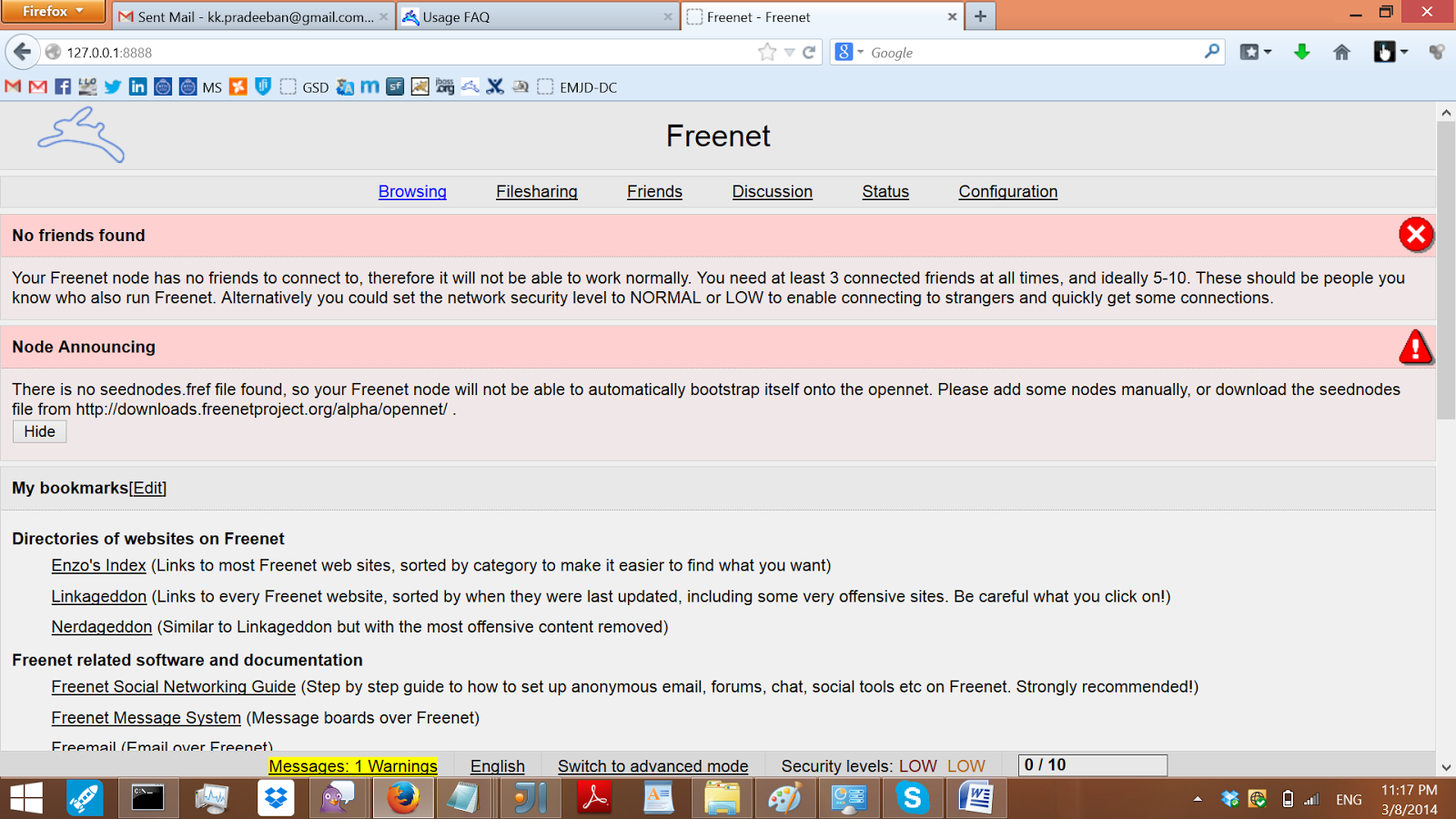
Configuring Freenet from Firefox.
My interest on Freenet is mostly towards its goal on the Internet Freedom. Freenet is a software that lets users use share and browse cites without the fear of censorship, while providing anonymity.

In this post, we will see how to build and use Freenet from the source in Windows 8.1. (After 5 long years, I have come back to Windows. It doesn't mean that I have forgotten Linux. I still love Linux and open source. But I hope I can contribute to the open source in different ways using Windows.)

You need java, ant, and git for this. 
First checkout the source code.
$ git clone git://github.com/freenet/fred-staging.git

Rename the checked out directory fred-staging to fred and go into it.
$ mv fred-staging fred
$ cd fred

Create a file "override.properties", with the below line as the content.
lib.contrib.get=true
Download bouncy castle jar and put it into the lib directory as bcprov.jar.
Download JUnit jar and put it into the lib directory as junit.jar.

To build,
$ ant

To build, skipping the tests and documentation tasks,
$ ant -Dtest.skip=true -Ddoc.skip=true

freenet.jar is built inside the dist directory. Move it into the lib directory, and run from the lib directory using the below command,
$ java -jar freenet.jar

Now you are done. Go ahead and read the Usage FAQ to configure and start using Freenet!

Saturday, June 16, 2012

Moments with Twitter - II

This post continues from my previous post, Moments with Twitter..  I just noticed the "Embed This Tweet" option provided by Twitter, that copies the tweet with formatting. However, I was just copy-pasting the tweets here.

#Google #hoaxes - Really funny. http://en.wikipedia.org/wiki/Google%27s_hoaxes Jun 20, 2010  
Google never fails to amuse the users with its easter eggs and April fool hoaxes

Seems a nice collection: http://www.alldissertations.com/univ.php Jun 21, 2010  
This is indeed a useful collection, with theses from multiple academic institutes.

sleepless night at Paris.. ;) Dec 08, 2010
This tweet is indeed remarkable. This was my first tweet from abroad, during my visit to Paris for SoCPar2010.

wanna discuss more about Google Summer of Code with other enthusiasts and students from Sri Lanka? Join #gsoc-lk at irc://irc.freenode.net Feb 10, 2011  
We created an irc (along with the mailing list, which is quite popular among the students) for the Sri Lankan students to discuss the GSoC among themselves. During the Summer of Code student application period, this room gets a bit of traffic, while remaining passive during the other days of the year.

If #Microsoft had Invented ... http://t.co/3GiwBgM ;) Jun 25, 2011  
We always enjoy a good set of jokes at Microsoft, as Linux fans. Not that we hate Microsoft. It is just we too love fun and a good laugh.

You and Your Research - http://t.co/I71uUkKA Oct 16, 2011
This is again a good read for the future researchers.

An interesting journey around the world.. http://t.co/qgVm0dt1 Jan 14, 2012  
This includes a nice set of photos taken around the world, by an artist.

Google Summer of Code Workshop in Poland - http://t.co/BL2UHNZ7 #GSoC Mar 29, 2012
This workshop from Poland reminded me the Google Summer of Code awareness sessions we had allover the country. We had 5 for GSoC 2012, and 2 for GSoC 2011.

Anti patterns - http://t.co/DswnzcUD May 29, 2012  
Learning anti patterns is more fun than learning patterns. It is more like learning from your own mistakes. It is also suggested that one should learn anti patterns before learning patterns, for the efficient use of the patterns. In any case, anti patterns are fun.

Friday, March 27, 2009

Unicode support for Windows 9x

Unicode support for windows is not a new topic to discuss at all, since Windows NT. When it comes to internationalization (i18n) Unicode plays a major role. Hence the usage of Unicode is obvious and not a strange topic to discuss at all. But when it comes to the older Windows 95/98/ME Systems, we have to consider more factors. Most software have stopped supporting these legacy windows operating systems at all. In that case, they have no need to worry at all. If an application wants the Unicode support, yet running on these obsolete versions of windows, which do not have the native Unicode support, the problem arises.

To solve this issue, Microsoft Layer for Unicode on Windows 95/98/ME Systems [MSLU] has been introduced. This component allows us to write a single Unicode application which can run on all the platforms, by providing a layer over the Win32 API on those earlier versions of Windows. MSLU contains two parts - Unicows.dll and Unicows.lib. MSLU is easy to use. Just compiling the application as a Unicode component and adding the Unicows.lib with the other libraries is enough. Similarly hence Unicows.dll doesn't load MSLU at all when using Windows NT or later, introducing this layer, doesn't cause a performance cost.

However it should also be noted that, MSLU not essentially will give the obsolete windows 9x versions, the same multilingual support that the later versions of windows provide. The application does get a Unicode face from MSLU, but still has to deal with a non Unicode operating system internally.