Friday, January 24, 2020

Quickly view your DICOM files locally

Install Kheops and OHIF Viewer with Docker
$ docker run -p 3000:80 ohif/viewer:latest
  
Now, OHIF Viewer can be accessed from http://localhost:3000 and Kheops from http://localhost:8042/

Load any Dicom files to your Kheops and click the "Open OHIF"

It will take you to a long URL of the hosted OHIF Viewer online. Most likely this won't work.

https://ohif.kheops.online/viewer/?url=http%3A%2F%2Flocalhost%3A8042%2Fapi%2Flink. ....

In the above URL, replace https://ohif.kheops.online/ with http://localhost:3000 as in

http://localhost:3000/viewer/?url=http%3A%2F%2Flocalhost%3A8042%2Fapi%2Flink. ....

Now you see the DICOM images in your own OHIF Viewer deployment.

Tuesday, January 21, 2020

Setting up Kheops - the docker projects

Kheops deployment consists of several Docker projects. This post lists them, adopted from the CI docker-compose.

UI 
1) kheops-ui:
    image: osirixfoundation/kheops-ui:${KHEOPS_UI_IMAGE_TAG}
    https://github.com/OsiriX-Foundation/KheopsUI

Reverse Proxy
2) kheops-reverse-proxy:
    image: osirixfoundation/kheops-reverse-proxy:${KHEOPS_REVERSE_PROXY_IMAGE_TAG}

Authorization
3) kheops-database (postgresql):
    image: osirixfoundation/kheops-database:${KHEOPS_DATABASE_IMAGE_TAG}
    https://github.com/OsiriX-Foundation/KheopsDatabase

4) kheops-authorization:
    image: osirixfoundation/kheops-authorization:${KHEOPS_AUTHORIZATION_IMAGE_TAG}

5) kheops-dicomweb-proxy:
    image: osirixfoundation/kheops-dicomweb-proxy:${KHEOPS_DICOMWEB_PROXY_IMAGE_TAG}

Zipper
6) kheops-zipper:
    image: osirixfoundation/kheops-zipper:${KHEOPS_ZIPPER_IMAGE_TAG}

Authorization Proxy
7) pacs-authorization-proxy:
    image: osirixfoundation/pacs-authorization-proxy:${PACS_AUTHORIZATION_PROXY_IMAGE_TAG}


DCM4CHEE PACS
8) ldap: LDAP Server initalized for the DICOM Archive
    image: dcm4che/slapd-dcm4chee:${PACS_LDAP_IMAGE_TAG}

DCM4CHEE LDAP also internally uses its own Postgresql database.

9) archive:
    image: osirixfoundation/kheops-dcm4chee-arc-psql:${KHEOPS_ARC_IMAGE_TAG}

In addition to these 9 docker containers, Keycloak runs in another VM and communicate with these containers.

We need to fit the dockers in an appropriate number of VMs.

A conservative approach would be, 2 VMs.
1 with Keycloak and everything else with the Docker containers on the 2nd.

I think the Kheops proposed approach would be 7 VMs.
1. Keycloak
2. Kheops UI
3. Kheops Authorization
4. Reverse Proxy
5. Zipper
6. Authorization Proxy
7. DCM4Chee PACS

But maybe, Kheops UI and Kheops Authorization can be merged into a single Kheops VM. In that case, we can also move zipper into that Kheops VM. Probably Authorization Proxy should just live with dcm4chee PACS.

Then we have 4 VMs:
1. Keycloak
2. Kheops containers (kheops-ui, kheops-database, kheops-authorization, kheops-dicomweb-proxy, and kheops-zipper)
3. Reverse Proxy container (kheops-reverse-proxy)
4. DCM4Chee containers (slapd-dcm4chee, kheops-dcm4chee-arc-psql, and pacs-authorization-proxy)

I think the 4 VM route is decent.

Panamá: Self-discovery in a solo trip..

View from my room
I had a long weekend for MLK day. I decided to pay a quick visit to Panamá since it gives visa-free entry for those who have a USA visa (conditions apply). There is also a direct flight from Atlanta to Panamá city with Delta, which was good. The flight goes direct south, from Atlanta, flying above the beautiful Carribean sea.

I already checked the surroundings of the airport before my trip. When I arrived, everything looked familiar. I had my lunch at the small cafe-restaurant named "Chicken port restaurant" near the Panamá Tocumen airport.

While there is public transport, getting the public transport card from the airport seemed impossible. I decided to go with Uber. As a pleasant surprise, the Uber drivers were very friendly and helpful. I did not get a SIM card. I used the Airport wifi to order the Uber. After that, wherever I went, I just connected to the destination's Wifi to call Uber. Interestingly, almost all the tourist sites in the city had a decent public Internet.

I stayed in Radisson Hotel Panama Canal. My room had a lovely view of the Panama Canal, which looked great during the sunrise, sunset, and every other time. I visited the Miraflores Locks: Centro de Visitantes de Miraflores the morning, and then Biomuseu. I saved some money by buying the combination ticket for the Miraflores Locks and Biomuseu.

From the Biomuseu, I walked to Centro Natural Punta Culebra, where I saw a slowly moving sloth on a tree and an iguana couple having sex on the tree (the female iguana fell from the top of the tree, by the end of the act). I also saw an anteater minding its business in the bush. Then I walked to the Balboa neighborhood. It was very sunny and hot. But the walk near the bay was lovely. I had a late lunch: Prawns in passion fruit sauce in Bucaneros restaurant in Flamenco island.

The trip felt like a self-discovery. I also felt very welcomed, and it became my most favorite trip after Portugal/2012. Of course, thanks to the wonderful people of Panamá. Hopefully, I will be back in the future.

Monday, January 20, 2020

The Birkman Method

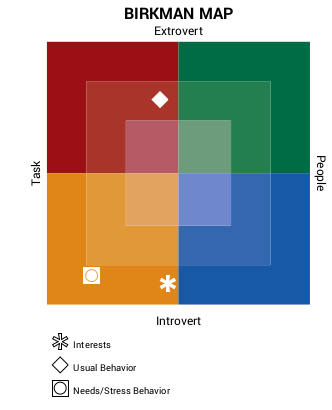
We recently had a Birkman session at the university. This is the summary map I got. So I am usually an extrovert - which I think is correct.

Image
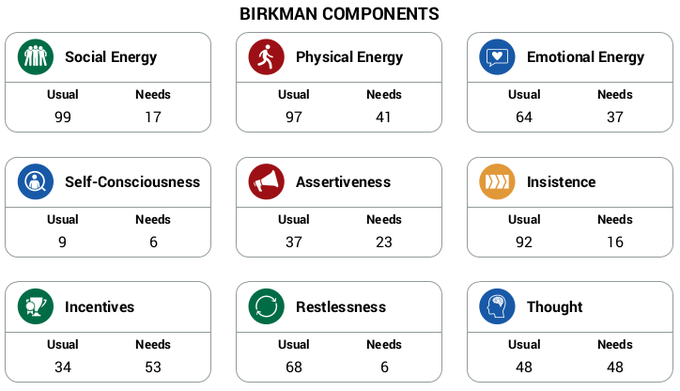
 The detailed components go like this.
Image

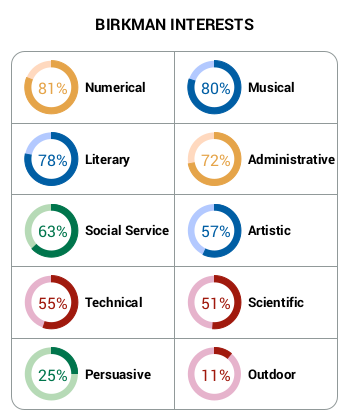
Then my interests are as below.

Image
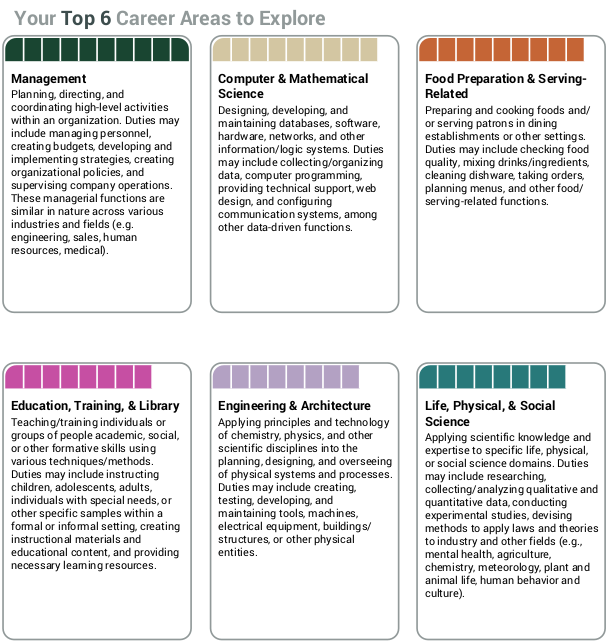
 Finally, my top career areas to explore:

Image

That's it folks. Birkman uncle told me I should manage a Sri Lanka restaurant. lol. Restaurante Sri Lanka em Parque das Nações (Ano 2048) 😇

Friday, January 10, 2020

Stop the small talk if you need information

I hate small talk online and offline - especially when it doesn't go anywhere and performs zero information exchange despite consuming considerable time. This post talks about why I hate small talk online.

They: Hi
Me: Hi
They: How r u?
Me: Good, thanks, and you?
They: Good too. 

So what's next? Do I need to continue this chat? Note how I was the one who typed more characters above despite them starting the convo. Come to the point directly! I am not here to lead and drive the communication that you started (unless we are close and we know each other very well). If you are chatting online with me through LinkedIn, very likely there is a reason. You don't message someone without a purpose, especially a stranger -- that too using professional network platforms such as LinkedIn.

These days, if the message comes from an unknown youth, I cut them short to help both of us. 

They: Hi 
Me: Hi 
They: How r u? 
Me: Anything I can help with? 
They: I want to apply to GSoC. How to proceed? 

See, I have prevented that unnecessary bluff and waste of network bandwidth.

My suggestion to the youngsters, don't ask to ask. Just ask. If someone has responded to your chat/message, you have already achieved their attention. Most people have a little attention span. Don't lose that to small talk. Instead, come to the point instantly. Although chats are synchronous technically, they work more asynchronously in practice. I am not glued to my computer to slowly receive each piece of message and reply. But if you message the important/core communication at once in brief, it can get you the answer faster.

Often the below communication works better. Shorter and more to the point, but more complete than the previous 2.

They: Hi Pradeeban, I want to apply to GSoC with Emory BMI. How to proceed?
Me: Hi, Thanks for your interest. Please check https://github.com/sharmalab/Emory-BMI-GSoC

All it needed was just one single message exchange. Not three or more as in the second and first cases.